
Microsoft killed the traditional Start menu with Windows 8. Now, however, it looks like Google’s Chrome browser is about to launch a very Start menu-like option for its Windows users. As the good folks over at Chrome Story noticed earlier this week, the latest Chrome Canary builds feature an option to enable the same app menu for the Windows taskbar that Google already uses on Chrome OS.
It’s important to note that this isn’t exactly a replacement for the Windows Start menu, as it just focuses on Chrome web apps. It probably isn’t a coincidence, though, that Google started working on this feature just after the launch of Windows 8.
The Chrome App Launcher is currently only available in Google’s highly experimental Chrome Canary builds (the good thing about these is that you can install them without touching your regular stable Chrome install). Even there, it’s still a bit hidden. You have to open chrome://flags and then look for the “Show Chrome Apps Launcher” option all the way at the bottom of the page.
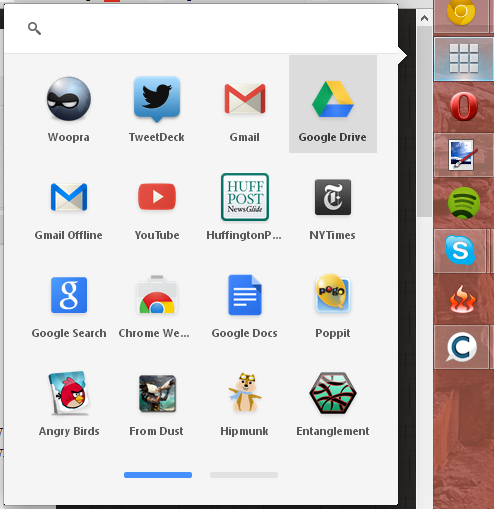
The app menu works just like the one Google introduced in Chrome OS when it gave its browser-centric operating system a more Windows-like look earlier this year. The menu is paginated and shows up to 16 apps per page. You can also use it to initiate Google searches.
Given that this is in the Canary release (and even hidden there), there are obviously still some bugs. The app sometimes just opens up a new Chrome window instead of showing the launcher, for example. Over time, this feature will probably find its way through Google’s usual release channels (dev, beta, stable), so expect to see this as a standard option sometime early next year.