 I still don’t particularly like the fact that Google decided to bundle Adobe Flash with their Chrome web browser about a year ago. Apple preference aside, the last thing I want is the buggy, often insecure, and performance killing plug-in shoved in my face. More importantly, I think it’s a maneuver that will only serve to slow the transition to HTML5. But Google has their reasons. And today, we see one of the good ones.
Google has maintained since they started bundling Flash that it was mainly to ensure they could make it more secure for their Chrome users. They do this by both sandboxing it and auto-updating it when the security patches regularly appear. But a new feature has just hit the Chrome dev builds which also now allows users to easily clear Flash cookies from within the browser.
Normally, when Flash is run as a standalone plug-in (as it is with all other browsers), users have to visit an Adobe website to clear Flash Local Shared Objects (LSOs). In other words, almost no one ever did that. Worse, the vast majority of users probably didn’t realize you even could do this — or that you perhaps should.
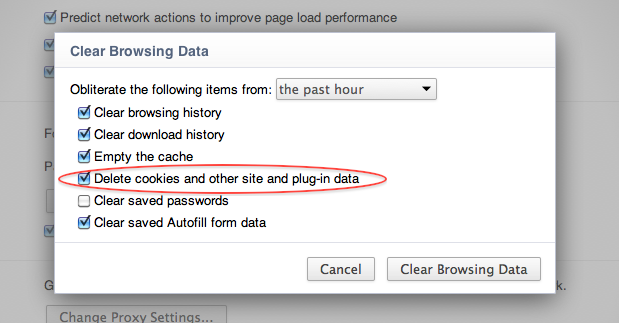
The newest builds of Chrome now bring this Flash cookie clearing right within the browser settings. In the “Clear Browsing Data” menu area (found at Wrench > Tools > Clear browsing data) you’ll now see the option to “Delete cookies and other site and plug-in data”. Selecting this will include Flash cookies.
Better, you can also set up Chrome to clear all plug-in cookie data every time you close Chrome. Other plug-ins will be able to work with this browser feature too if they use the NPAPI ClearSiteData API baked into Chrome (Adobe is now using it with Flash 10.3).
So, credit where credit is due — this is a solid move by Google (and Adobe) to further clean up the Flash experience. If they’re going to bolster the plug-in to the detriment of HTML5 (and ultimately, I think, the web itself), at least they’re improving it as well.