Numbers don’t lie: Google’s Chrome web browser is indeed the dominant browser on the web. Since we surf the Internet so damn much, it takes a toll on our precious little devices. Be it a laptop, Chromebook, or whatever other device you can get Chrome on. Today, the team announced that the latest stable version of Chrome will save your battery life just a tad. Well, more than a tad for some.
In addition, Do Not Track Support is finally in Chrome:
This latest release also includes an option to send a “do not track” request to websites and web services. The effectiveness of such requests is dependent on how websites and services respond, so Google is working with others on a common way to respond to these requests in the future.
This is of course helpful for those of us who don’t want our surfing habits tracked as we move about the web, for advertising purposes or otherwise.
Here’s what the Chrome team said today:
We recently enabled GPU-accelerated video decoding for Chrome on Windows. Dedicated graphics chips draw far less power than a computer’s CPU, so using GPU-accelerated video decoding while watching videos can increase battery life significantly.
In our tests [1], the battery lasted 25% longer when GPU-accelerated video decoding was enabled. Now Chrome users on Windows will experience longer battery life so they don’t get cut off while watching their favorite YouTube video on repeat.
While this sounds like an extreme test, I often leave tabs open on my browser with YouTube videos running. In fact, when I have the sound off on my computer, or leave my headphones plugged in when I walk away, I’ll come back to a playlist on YouTube playing obnoxiously. So there’s something to this test.
In addition to battery life savings, the Chrome team has also rolled out easier controls for handling specific website permissions, such as geolocation and video and microphone access. Basically, the browser is helping you save on resources and privacy if you don’t need to have them on in the first place. A lot of sites these days check for your location, even when they don’t really need them. It’s annoying.
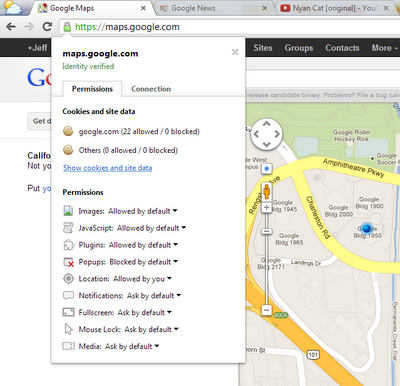
The idea of using a lock to keep things controlled is easy enough for anyone to figure out. Since Chrome is dominating the marketplace, Google is going to have to keep on top of being at the forefront with ease of use, as well as resource usage. Safari and Chrome are my browsers of choice, and I personally can’t stand IE, and my Firefox usage has tailed off as of late.
If you’re a Chrome user, you probably get updates automatically, and if so, you might notice that your device’s battery life just got better.
To update yourself, just go to “About Chrome” in the menu bar and it will start updating.
[Photo credit: Flickr]