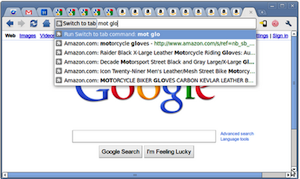
 If Chrome’s best feature is its speed, it’s second best feature has to be the Omnibox. I’m still not sure why every browser doesn’t simply offer one box for both searching and typing in URLs. But the Omnibox is about to get even more powerful, as developers have started fleshing out extensions to take advantage of it.
Google first talked about the Omnibox API back in August of last year, but at that time, it was experimental. But today they’ve done a new post on the Chromium Blog to highlight the option. And developers are wasting little time getting extensions working for it.
In their post, Google highlights an extension called Switch to Tab. It’s a neat little extension that allows you to use the Omnibox to easily switch between tabs. All you have to do is type “sw” and then hit <tab>, and you can start typing the letters of the tab you want to switch to. Why do this instead of clicking on a tab with the mouse? Well, perhaps you have a zillion tabs open and you can’t find what you’re looking for with a quick visual scan. Or maybe you have a ton of Amazon tabs open that all look the same, but are all different products.
Anyway, the extension itself seems a bit more like a proof-of-concept as it was apparently developed by Aaron Boodman, a key member of Google’s Chrome team, and Frank Yan, a member of Mozilla’s Firefox team (it’s a built-in feature of Firefox 4).
A cooler extension made outside the browser company ecosystem is > Quora Search. This Chrome extension allows you to yep, search Quora. We covered a simple extension that did this back in December, but this one is better because again, it just uses the Chrome Omnibox — no extra buttons or boxes needed.
With > Quora Search, you simply type whatever you want to search for on Quora into the Omnibox followed by “>quora”. Quora will load immediately with the search results.
AddonFactory, the team behind this extension, is planning similar extensions for other services as well. And they’d like to make an extension that allows you to Tweet or update you Facebook status from the Omnibox as well.