 Sometimes, it’s the little things in life.
Earlier this evening, Google published a post on their Chrome Blog highlighting some of their favorite new extensions for the Chrome web browser. As there are now something north of 8,000 Chrome Extensions out there, this seems like a good idea (which Google plans to do regularly) to highlight new ones. But buried at the bottom of the list is one Google made themselves. It’s called Highlight to Search. And it’s awesome.
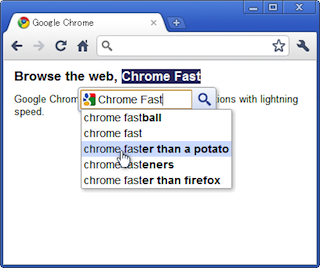
It’s such a simple thing: when it’s installed, any word you highlight with your mouse cursor on any webpage will bring up a search magnifying glass icon below it. Clicking on that will open a tiny Google Search overlay box with that word already entered. An auto-suggest drop-down also populates just in case you’re looking for something related. And clicking on any of the suggested results will open the full query in a new Chrome tab. Again, so simple, so obvious, but so useful.
The truth is that you could sort of do something similar already with Chrome. If you highlight any word and then right-click, you’ll see an option to “Search Google for XXXXXX”. I use it all the time. But the extension saves a right-click, gives users a much nicer interface, and gives you auto-suggestions.
The app has actually be out for a few weeks, but only has a few thousand installs. For comparison sake, the Chrome to Phone extension which Google also recently released has nearly 200,000 installs.
This is yet more proof of why extensions are awesome. One man’s potential bloat (which this would be if it were a default feature) is another man’s treasure.