 For the longest time, all I’ve wanted is a solid native Mac client for Gmail that supports starring of messages. Sure, there have been some out there, but they’ve all been lacking. Today, I may have finally found a good one.
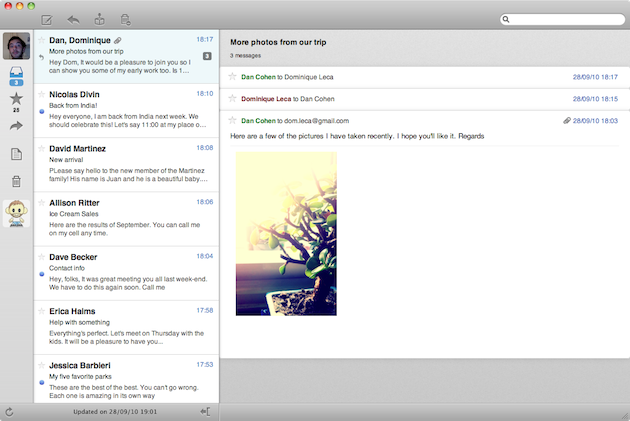
Sparrow is a super-simple Mac client for Gmail. If you’ve used Tweetie for Mac (which is now owned by Twitter, but development is more or less frozen), you’ll feel right at home here. On the right hand toolbar you’ll find a big icon for you account (again, just like Tweetie), your inbox, your starred items, your replies, your drafts, and your trash. Along the top of the window, you’ll see an option to compose, reply to, archive, or delete. Naturally, there is also a search bar as well.
Syncing your message initially takes a little bit of time, but not too long. And the number of items you have starred is shown under the star menu area. A new message indicator is installed in the top toolbar on your Mac, and it also supports Growl. The minimalist UI can be expanded a bit if you choose to use the Preview pane — which does exactly what you thinking: shows you a preview of the email you select.
But the best part of Sparrow may be the multiple account support. You can add as many Gmail accounts as you’d like and switch between them with a mouse-click in the left-hand menu (once again, just like Tweetie for Mac).
There are several other subtle UI elements that are great, and a nice change of pace from the comparatively utilitarian Gmail. And yes, Sparrow even supports Gmail message threading.
All that said, as it stands, I don’t think Sparrow can replace web-based Gmail for me for a couple reasons. First, it’s too slow. Message come in via IMAP, and that’s always going to be slower than the website which gets messages in realtime. Second, neither labels nor Magic Inbox is supported yet. I could see Sparrow pretty easily adding options for both of these (well, when Google makes Magic Inbox options available for third-parties, that is), but right now you’re pretty much out of luck if you’re dependent on either.
Still, Sparrow is an awesome first step towards a true native Gmail client for Mac. And the team behind it promises that support for other email providers via IMAP will be coming shortly. Find the free beta here.
And one more sidenote of caution: after running for a few hours, Sparrow jacked my CPU to 100 percent for no apparent reason.
[via Daring Fireball and The Next Web]