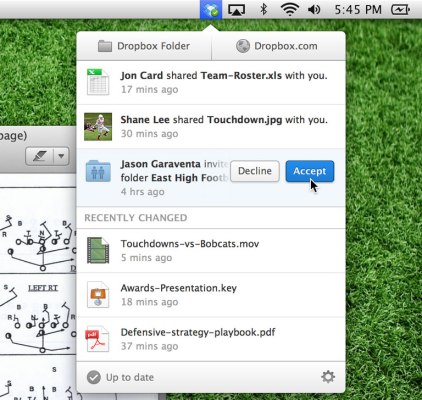
The cloud storage buffs at Dropbox have spent quite a bit of time optimizing the service for mobile devices (and mobile developers, naturally), but the Dropbox desktop client looks and works much the same way it did a few years ago.
Well, that’s not the case anymore — the company has just pulled back the curtain on a 2.0 update for its desktop clients that adds some much-needed graphical flair and streamlines the sharing process.
There’s a lot to dig into here, but it’s worth noting that the redesigned menu just looks great — it’s a refreshing change of space from the spartan menu of yore. Much as I like it though, it’s not quite a slam dunk since some of the more useful features (think a ticker for how much available space you have) have been hidden away and require another click to get to.
Dropbox has been putting greater emphasis on sharing files and folders these past few months, and the team has worked to make sharing more prominent in the revamped menu. Mousing over recently edited files displayed in the menu reveals the option to share them with others with a single click, and users can view and dismiss notifications generated when their friends and loved ones share files and folders with them. Those sorts of notifications don’t just live on your desktop though — Dropbox has also said that users of the iOS and Android apps will get notifications as well, though I imagine some users may not appreciate the prospect of having even more mobile notifications to wrestle with.
The updated clients are now live and can be downloaded here, but there is one potentially big caveat: Linux users can download and install the update but this forum post suggests they aren’t privy to the new menu design just yet.