• battlefield-13a_01battlefield-13a_02

  • Add A Cool Linen Background To Google Docs

    John Biggs

    Biggs is the East Coast Editor of TechCrunch. Biggs has written for the New York Times, InSync, USA Weekend, Popular Mechanics, Popular Science, Money and a number of other outlets on technology and wristwatches. He is the former editor-in-chief of Gizmodo.com and lives in Bay Ridge, Brooklyn. You can Tweet him here and G+ him here. Email him directly at... → Learn More

    Monday, April 2nd, 2012
    Screen Shot 2012-04-02 at 9.06.08 AM

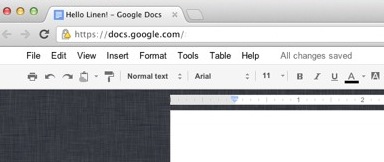
    Today’s PSA is brought to you by the letter L. What word starts with L? Linen! If you’ve ever used Google Docs, you’ll recall that the interface is wildly ugly. Well no longer. Using a plugin and a nice, big Linen JPG, you can turn GDocs into a thing of beauty.

    For whatever reason (probably for SEO), a Brisbane, Australia driving school is hosting this Linen background for GDocs and is offering a set of simple instructions to set it up. While I don’t want to ruin their Google juice, here’s how to do it:

    1. Install Stylish for Chrome or Firefox (IE users can pop over here).
    2. Install the UserStyle.
    3. Enjoy.

    The creator, Matt Williams, noted that the background is “inspired by iOS/OS X Lion” and his noble goal was to make Google Docs pretty. Thanks to you, Mr. Williams. And if I’m ever in Brisbane, I promise I will take driving lessons from your teachers.


    Product: Google Docs
    Website: docs.google.com
    Company Google

    Google Docs is Google’s free web-based word processor, spreadsheet, and presentation application. The online app allows users to easily share documents and collaboratively work on them in real-time. On March 31st, 2008, the Google Docs team announced integration with Google Gears, allowing users to edit their documents offline.

    → Learn more