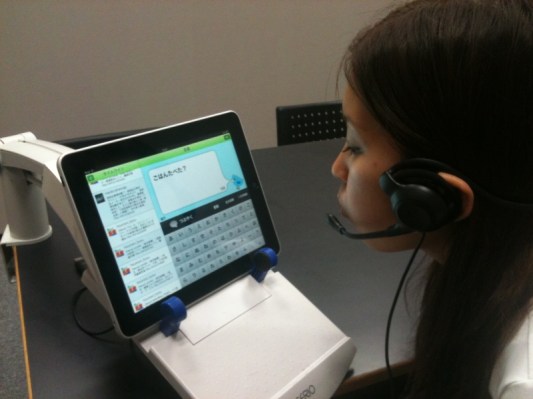
A Japanese company called TechFirm [JP] has just a released a very special (and free) Twitter client for the iPad in the App Store [iTunes, bilingual English and Japanese]: “Breath Bird” lets people who can’t use their fingers and have problems speaking post to Twitter by breathing into the iPad’s mic.
The way it works is that when you fire up the app, your timeline appears on the left hand side of the screen (it refreshes automatically to keep things simple).
On the right, an on-screen keyboard with all characters from a-z split into five rows appears (see below). Breath Bird starts highlighting each row, one after the other, from top to bottom. If the row in which the character you’d like to “type” is highlighted, breathe into the mic to make the app highlight all characters in that row one after the other, from left to right.
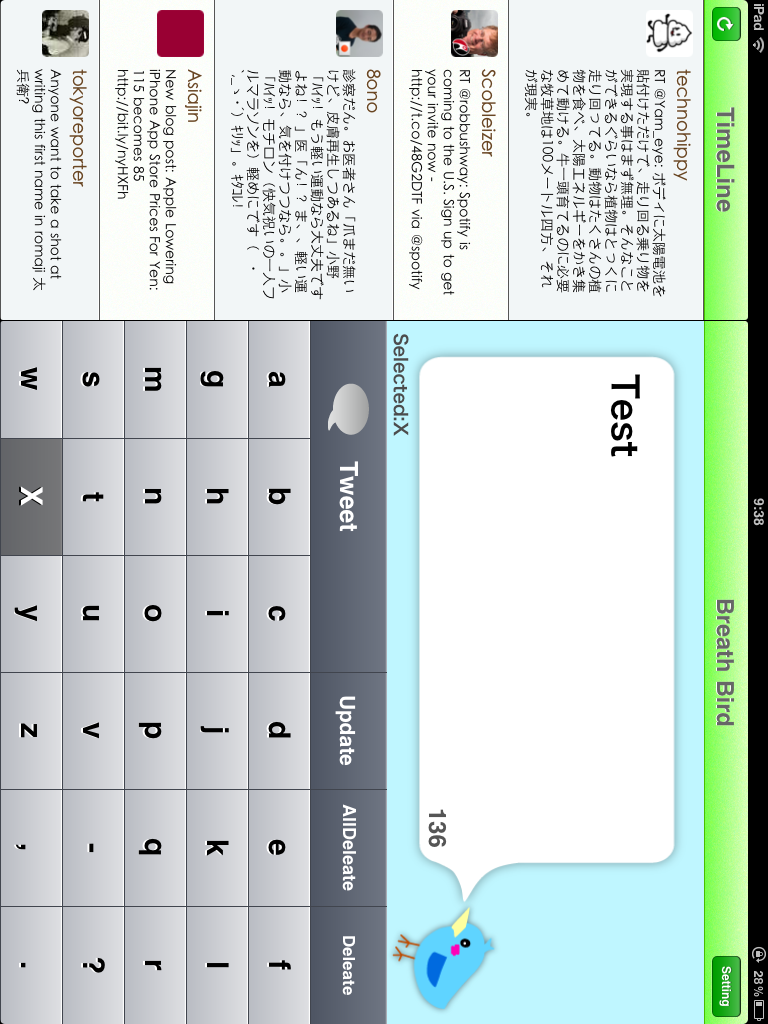
Once the character in question is highlighted, breathe again and it appears in the tweet bubble on top of the screen – repeat to create entire words and sentences that can be posted to Twitter in the same way.
I tried Breath Bird out: the process is cumbersome at first, but the app actually works pretty well (surely even better with an external mic), and more importantly, it’s probably a godsend for the target group.