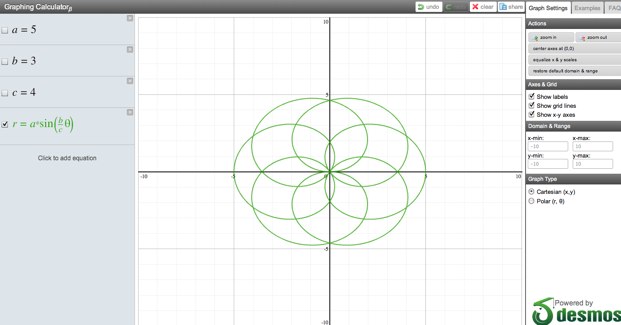
One of the killer features of the Desmos Whiteboard is an interactive calculator that graphs equations as you write them. (Founder Eli Luberoff was a double math and physics major at Yale). Desmos has now taken that and rewritten it as a standalone online graphing calculator. It instantly draws the equations as you update them, it’s free, browser-based, color-coded, and you can share any graph with a bitly link.
You will never have to buy a Texas Instruments calculator again (do they still make those?)
Desmos closed an $800,000 seed round the day before Disrupt NYC from Mitch Kapor, Learn Capital, and Kindler Capital.
very warm welcome when they come on.
It's really hard to be up here and pitch a business.
For some of the companies, this is
the biggest pitch of their
company so far.
So do give them a very warm welcome when they come on.
Let's welcome to the
stage from SHL TeleMedicine, Shay
Leibovitz and the VP
of business movement and sales and Iki Alroy, the CTO.
No?
Wait.
Eric is, it 's already been disrupted.
What's happening?
Well, why is...?
Oh.
Ok.
Let's do that all over again.
Let's pretend none of that happened.
Apparently, we are just randomizing the order,
so that maybe next time
I just won't announce the name,
we can just guess, when they
come on, who they are.
So, in that case, please welcome
to the stage from Desmos, Eli
Luberoff, the founder and CEO, and Andrew Gu, the CTO.
Which one?
It's a session four.
Session four.
There's only one, two, three.
Thank you so much, so I'm
Eli Luberoff, founder and CEO
of Desmos, thanks for switching the order.
I'm here to tell you about
the future of education. I
am joined here on stage by
Andrew Gu, our CTO who
couldn't be here yesterday, because he
was busy graduating, and by one of my favorite toys.
This is an interactive touch screen,
and I just want to show you what this can do.
These are taking over classrooms in this country.
More than a quarter of United States classrooms have one of these in them.
And what it is, is a
regular projector that you can touch and interact with.
So I just want to show
you this, you can drag
things around, really, really cool taking over this country.
But, there's a huge problem, which
is that there are a lot of
different companies manufacturing these, and
every single one of them
has a different piece of
software for building interactive content.
That means your content is
locked not only into your
platform, but it's locked into the classroom.
You can't access it from home.
Teachers can't access it from home.
We have a solution.
So I want to show
you this exact same lesson built in our software.
So here it looks exactly
the same, but what you will
notice is this is now completely browser based.
It is inside the Safari browser.
This means two things: one it
means it works on any device
that has a browser; the other,
it means that multiple people can interact with this content simultaneously.
So, Andrew, why don't you do the same thing and drag out a label.
Fantastic, and we actually have
Greg, another person from our
company in the audience on
a PlayBook and he can drag
something as well, and we'll be able to see it up here.
So you can see him dragging it from his PlayBook.
No special installed software.
Did everyone see that?
Really, really cool.
So let's go to page two of this.
Check our answers.
It turns out that we didn't do very well.
Let's go to page three.
What we have here
is just an example of anther
type of lesson that you can do.
So, this is geography.
Andrew, why don't you tell us which state has a capital of Olympia.
This is actually your home state, and there it is.
And Greg, can you tell us which state has the longest coastline?
Again, from the audience, on his PlayBook, dragging this out.
No installed software, all browser based.
Alright, so let's go to page four.
What we have done is
we have managed to replicate downloadable
software and put it in-browser.
I don't think this is a crowd where I need to tell you why and that's awesome.
But, that's not enough for us.
We wanted to solve other problems in education.
So one that is most
frustrating to me, as a
math and physics major, is that
it's really hard to do math on a computer.
No longer.
Andrew, I want to you take
our equation tool and write out the equation for a parabola.
So he's just gonna type this out.
It's gonna auto-format.
This is a functioning calculator.
Take out the graph paper, drag
out a graph, and now
take that equation and drop it
on top of the graph paper and it's gonna process it.
I want you to take that equation and modify it.
Let's move it 2 units to the right and 3 units down .
Here you can see
the graph updating as you change the equation.
A totally new way of interacting with math.
I'm a total math nerd.
I know not all of you are.
I'm gonna leave that there except for questions.
I just wanted to say, Texas
Instruments, your monopoly on
graphing in the classroom is over.
Alright.
Thank you.
This is a lesson we
were able to collaborate with Greg,
but now I want to share
this the world, and the
way that you do that is with
our publish feature which we're introducing today.
So if you press this publish button,
what it's going to do is process
these pages and we're going
to see, if you go over to the
second tab now, the final
result of that is here,
where it's made thumbnails of each page.
You can give it a title, you can give it a description.
You press submit, and it's
going to now be a fully
published, accessible lesson.
So, if we go over here, this
is the exact same lesson but
it's now totally different in that
a million people can look
at this simultaneously interactive, they each have a local copy that they can work with.
We have embed code for
this so you can share it on
a learning management system or in a blog.
You can link to this.
You can view it as a PDF.
You can even download an offline
version of this that doesn't require
you be connected to the internet so that it can be used in classrooms.
So this is what we were able
to do with our software, I want
to show you what a professional is able to do.
So, this is actually the first time this lesson has been seen.
It was built by New England typographic services from McGraw-Hill.
And let's close that.
And this is a beautiful lesson
that they did using just our tools,
building it in ours instead of a native piece of software.
So click on the Explorer and
here you are going to see we've embedded a video.
Let's go down to the apply,
and here we have got all sorts of interactivity.
You can imagine touching this.
You can do it in browser.
So, let's see what clue one for word A is.
All right, there's clue 4.
Soil, you can click.
It's interacting, this is truly interactive content.
So I want to leave that there.
But I have two really important announcements to make.
So the first is, as of last Friday, we are funded.
We have $800,000 financing
led by Mitch Kapoor, followed by
Learn Capital and Kindler Capital,
we're incredibly happy about that.
And what we're gonna do is make this even better.
The second announcement is that
as of right now, you
can register for our site for the Alpha version.
You need the code TCDISRUPT.
We've launched.
500 people can do
this and I am going to leave that there.
I hope that you will join us and changing the future of education.
Thanks.
That was Desmos.
That was, day two is going to be a good day, I think.
Also I went to school in the wrong decade.
That was cool.
Tony.
Thoughts and questions?
Nothing?
Not yet.
You can't pass on to Chris.
Alright, Chris.
Yeah, so first of all, that's totally rad.
I'm curious, what's the
rate of adoption in schools
these days, and what's the channel to get there?
I mean, so, you've built this
really cool tool, it's browser
based, so there isn't really
a deep software commitment on behalf
of schools, but how do you get to the decision makers there?
That's an excellent question.
So these, the boards
have infiltrated 25% of schools here, 80% in the UK.
But right now they are not really being used to their full potential.
They are mostly being used is dry
erase boards that are really
expensive, or overheard projectors that are just a little bit expensive.
How do we get to them?
So we're actually trying to bottom
up approach on one side, which
is why we're going to launch for
all teachers as soon as we 're out of our testing period.
But the others that were working
with are publishers, who've already
invested a ton of resources into this kind of content.
They had 400 million dollars
in revenue last year, small fraction
of their revenue for the top
four publishers, but 400 million
dollars in revenue from interactive content
and they love this.
The reason is that they
can build a lesson once and
get it to all teachers instead of
having to build it three, four
or eight times.
I just wondered, who are
the four public, who are the
four big educational publishers that you are talking to?
So, McGraw-Hill, Houghton Mifflin Harcourt,
Pearson, and Cengage are the big four.
We have actually pilot projects with all four of them.
OK, great.
Yeah .
I mean it kind
of reminded me of the
first time I saw OddPost actually
with this like beautiful javascript and AJAX stuff.
It reminded me of the first
time I saw Tony's company and so
I thought that was beautiful.
It just seems like a lot of different applications.
I mean, I don't know if you're
focused on one thing or if it's a portfolio of products.
You know, tell me more about the actual products that you're launching.
Is it all of these things?
So, which things are you talking about?
I mean are you launching a whole portfolio of
products or is it a general purpose tool?
It 's a general purpose tool.
So, we want this to be a platform on which other people can build content.
We'll do it too, publishers will do it as well.
But it's just a platform for building any subjects.
So, I'm really good at building
math lessons, but there are other people who're great at building history lessons.
We want them to be able to build using this as well.
And it's basically two applications for launching
which is the collaborative version, the
whiteboard that you saw, and then
also this published version that you can then embed across the web.
I had a question about social collaboration.
So I watch my own children and the way that they like to do homework together.
Yep.
So how does that tool facilitate that?
So, this tool is fantastic for it.
The application built around it is not ready for that yet.
So one thing that we
didn't show you is that if
you create a whiteboard, which any student
could but I doubt many will at the beginning.
Once you build this whiteboard, you
can then invite anyone to collaborate
on it with you by emailing.
So that's what we did with Greg and the audience.
Was that the question?
I think that's your most critical hook.
I agree completely, I agree completely.
This is the alpha launch.
As I said we raised $100,000 up
until last Friday, $800
,000 last Friday, so when
we come back next year it's gonna be nine times as awesome if I know my math.
Awesome.
Any more questions for them?
Wow, okay short Q&A. Everyone seems impressed.
That's Desmos.
Big round of applause for that.
Alright, couple of quick bits of housekeeping.
Does anyone want some water?
I have water here .
Everyone good?
Yeah.
Also we are aware that there's