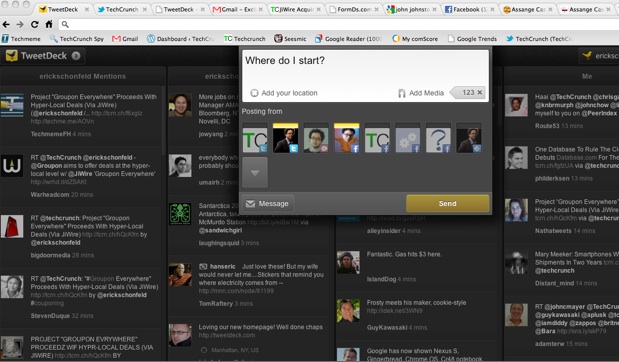
You can get TweetDeck, the popular realtime stream reader, as a desktop client, on your iPhone and iPad, or Android phone. But up until now, there was no Web browser version (unlike Seesmic, which is best known as a browser-based app). Today, TweetDeck released its first Web client as a Chrome app in the new Chrome Webstore.
“It’s definitely our best version of a desktop TweetDeck so far,” says CEO Iain Dodsworth. You can sign in with your existing TweetDeck account, and add different realtime streams in different columns—Twitter, Facebook, Foursquare checkins, Google Buzz. Soon it will support Gmail as well. ChromeDeck, as it was codenamed during development, borrows some UI elements from its most recent Android app. There are combined columns labeled Home (all timelines from various accounts), Me (all mentions and messages directed at you such as Twitter @replies), and Inbox (direct messages, and soon Facebook and Gmail messages).
The Chrome app is supposed to be faster, more stable, and less of a memory hog than the desktop AIR version. Once you “install” it onto your browser, it exists within its own tab. And it is always available for you, with any other apps you install, when you launch a new blank tab.
The first thing you notice if you are a regular TweetDeck user is that it is completely silent. That silence won’t last long, however. Dodsworth & Co. is working on “getting some TweetDeck sounds recorded and added to all the apps” in an effort to try to “create a social soundscape whereby you don’t even need to look at your screen and you have a sense of what’s going on.” Oh boy, my wife is going to love that. Bleep, Zoink, Boop.
I prefer the silence. (Silent-mode, please). The other thing you notice is how things pop up when you need them to and disappear when you don’t. Click on the compose box up top, and it expands to give you room to write, add images and your location, and select to which accounts you want to send out your message. Hit reply in your stream, and a reply box zooms up to the top of the column along with the Tweet or message you are responding too, all in-line. Smooth.