TechCrunch reader Steve Manuel claims to have found a workaround to Firesheep, the controversial Firefox extension that allows anyone on an insecure open Wifi network to access user login info for almost every single social network in existence.
Firesheep banks on the fact that most social sites default to the HTTP protocol because it’s quicker. The already existing Firefox extension Force-TLS attempts to circumvent this by forcing those sites to use the HTTPS protocol, therefore making user cookies invisible to Firesheep.
Like the alternative option HTTPS Everywhere, the Force-TLS Firefox extension allows your browser to change HTTP to HTTPS on sites that you indicate in the Firefox Add On “Preferences” menu, protecting your login information and ensuring a secure connection when you access social sites.
HTTPS encrypts user data, so if a script like Firesheep’s like tries to pull it, it can’t be read. Force-TLS forces a number of sites to make all of their requests over an SSL secured channel and while some sites, like Amazon, don’t currently have the secure option, the majors like Facebook, Twitter, Google, etc all allow a HTTPS connection.
How to configure:
1. Download the plugin here and install into Firefox.
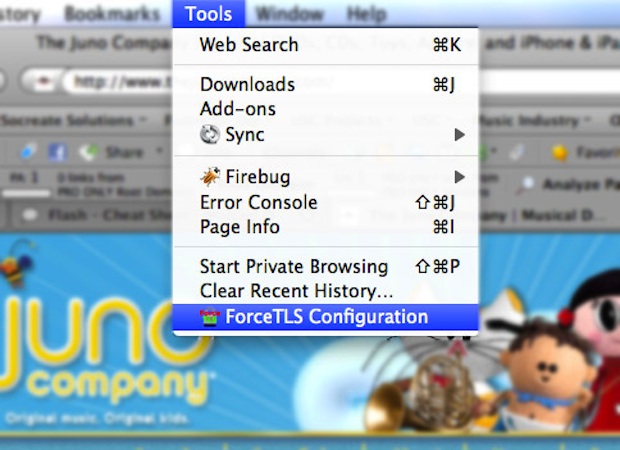
2. Open “Preferences” and add the domains you want to force the HTTPS connection with.
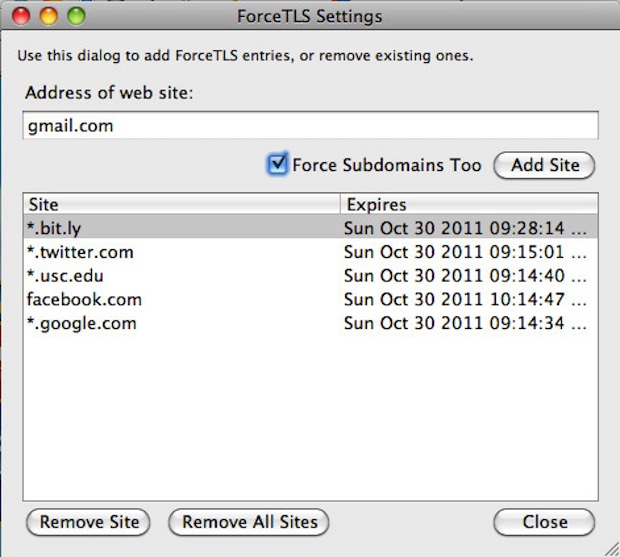
3. Restart Firefox.
Note: Unlike HTTPS Everywhere, Force-TLS relies on the user defining the sites they want to access through a secure HTTPS connection.
And while everyone should have learned by now that there’s always some privacy risk when interacting online, hopefully the installation of Force-TLS will at least put less of a damper on today’s stint at your local “free Wifi!” boasting cafe. I’m also looking into the possibility of equivalents for this extension on other browsers and will update this post as soon as I have alternative options.
Thanks: Steve Manuel
Teaser Image: Kevin Steele