Twitter is now seeing dozens of tweets a minute from users reporting that their Twitter updates are being posted as automatic updates to their Facebook profile, apparently without their consent. The change seems to have happened very recently, and reactions are ranging from surprise to anger.
At this point it isn’t clear exactly what’s going on — it seems like some users may have installed the official Twitter application at some point and not had it post updates until now. But others are reporting that they’ve never installed a Twitter-related app, which makes the situation all the more confusing. We’re reaching out to Twitter and Facebook to find out what the cause is.
My hunch is that these users have previously installed the official Twitter app on Facebook, which has had problems in the past, and used it to occasionally check their Twitter profiles without realizing that it was also meant to auto-post their tweets to Facebook (a bug may have prevented these posts from ever actually appearing). Now Twitter has fixed the bug, and users don’t know what’s going on. We’ll update as soon we we know the actual cause. Update: A Facebook bug caused this, see below.
It looks like this may have something to do with Facebook ignoring an application’s privacy settings. Under Facebook’s application privacy page, I’ve unchecked the box that gives Twitter the ability to post updates to “Publish recent activity (one line stories) to my wall”. However, the updates are still showing up. We’re seeing similar reports from users with the FriendFeed app installed.
Update 2: Facebook has given us the following statement:
Earlier this evening, a small Facebook bug allowed a handful of apps to publish to the stream on behalf of users who had previously authorized the app. The situation has now been resolved, and all application settings will remain intact for users.
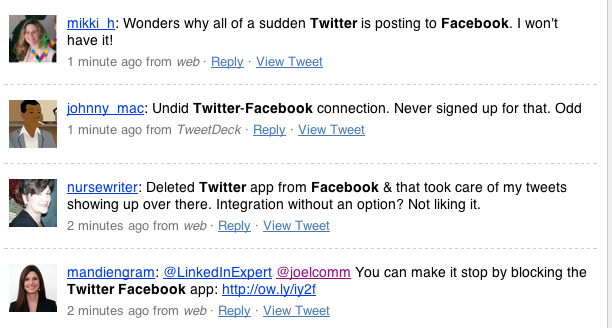



This just happened to me and I killed my Twitter app on FB. It stopped after that. Tweets should NOT be posted on Facebook without my consent.
The official Twitter app has been down for a few days now. I think only now Twitter has found the ways and means to rectify the bugs. People who have activated the official app, but did not see it working, now get to see it active. That is the problem! Your hunch is correct I think.
Update us if Twitter or Facebook respond.
fb is “refactoring” their whole app platform. http://developers.facebook.com/news.php?blog=1&story=283 what else can go wrong?
Not sure if it’s related but there is also an issue with another privacy setting, I have the option turned off to where when I comment on a friend’s status or anything else it shouldn’t publish in my time line. Yesterday was my first time using Facebook in over a month and I took on the normal habits of commenting, etc…to return to my profile to see it all published on my profile. I double checked my settings to make sure that there were no changes when they added the “everyone” option a while back and NO my settings were still the same as before.
Thats surprising with out users knowledge their tweets were posted there
Yes, just noticed this too. I did have the Twitter-Facebook integration turned on previously then switched to selective Twitter updates to FB (using the #fb hashtag). Now, I’m getting all of my tweets automatically posting to FB, which is not desirable in my case.
If Twitter has suddenly taken over your Facebook status, you can make it stop by blocking the Twitter Facebook application:
http://ow.ly/iy2f
I think Twitter FB app is going to see a lot of people unsubscribe it.
sweet delicious nerd tears.
“i only wants to post my tweet about my awesome sadnwich, not the tweet about the great deal on crocs i got. im calling a lawyer”
Step away from the API. Just goes to show we never really had control over anything. Just an illusion!!!
Isn’t there a selective twitter app on facebook that will put what tweets you want it to? You just put the “#fb” hashtag into it and it’ll update with those tweets only.
I suggest deleting both the Twitter App from Facebook AND removing the apps permissions. For some reason, deleting the app doesn’t remove permissions.
Yep,
I blocked the Twitter app on FB for the moment. Did the trick to stop the “autofeed” of my tweets on FB.
I agree!!
The reason is some changes they made around 3:40PM today as you can see here: http://developers.facebook.com/news.php?blog=1&story=283.
The interesting thing is that the “bug” allows Twitter (and FriendFeed in one case that I know of) to post to your FaceBook account but to submit a bug on FaceBook’s Developer site you need to login.
at first I thought this was amusing… but now I just realized that it turned off my friendfeed’s ability to post and this makes me unhappy
I fixed the friendfeed posting problem. go to twitter app in facebook. large button on top turns off posts. then authorize friendfeed to post by clicking here http://www.facebook.com/authorize.php?api_key=c12a9d70370d881bc232f45f7f06fe6c&v=1.0&ext_perm=status_update&next=http%3A%2F%2Fapps.facebook.com%2Ffriendfeed%2Fconnect
How is it possible that a Twitter-related app has never been installed? It would be very difficult for FB or Twitter to guess the correct account on the other network. More likely is that either people have given their Twitter info to an app or have given both FB and Twitter to a third party such as Friend Feed.
I think it’s Friendfeed; I had to go “block” the app from accessing my information, even though I never signed up for it. Thanks, Facebook. Another quality privacy violation! Awesome!
Jee, It happen here as well!.. How lame.
It looks like it’s the friendfeed app and the twitter app that’s autoposting to facebook… I just removed the app and that seemed to work. No longer updating to facebook.
@davidspinks
Also I have a random person who I am not following and he/she/it is not following me yet its appears in my Twitter feed, WTF Fatima_Huffman1
This just happened to me! I thought it was weird people started replying to something on facebook, which i rarely use. Then I saw it was the twitter post i just made. I used to use the twitter app but stopped using it. Frankly this pisses me off. I don’t like my messages getting sent to places where I don’t intend them. Since i don’t value facebook that highly, if this continues I will deactivate my Facebook account. Twitter >> Facebook!
I hope this gets cleared up soon as i’d like to twitter in confidence that nothing will get sent to facebook without me knowing!
I though it was tweetdeck app the one posting the tweet in my facebook account… I’m afraid thisone will eneded there…
Can some merciful soul please walk me through how to stop the tweets on FB? (slow like caveman).
It’s not just Twitter but FriendFeed as well… at least on my profile.
I don’t have the Twitter app and it happened to me. I did have the app months ago. How do I delete the apps permission if I’ve deleted the app?
I do have Ping.fm connected, but I didn’t post from there. I did a retweet from Seesmic web version that showed up.
It appears that it is just FriendFeed on FB that is doing it. I had installed the Twitter app on FB so that my Twitter status updates post. I noticed on a friend’s FB that even her @replies were posting…it looks like it is just from the Friend Feed app.
Pandora, Wine and Wheat Thins…..mmmm happy girl!!
You have to disable the Twitter app in Facebook app settings. Simply clicking “do not post without my permission” when you remove an unwanted Facebook tweet won’t work.
Never thought I’m like something better broken, but this blows. There ’s a reason I turned that feature OFF! Glad I kept the snarky comments to a minimum today.
It has to be Tweetdeck. I don’t use the Twitter app and I don’t use FriendFeed. I didn’t even know about FriendFeed till recently.
I blocked the Twitter app on FB and changed my password. Seems to have fixed things. Before now, the username (even though Twitter is just a name and Facebook an email addy) and password were the same. (Dumb, I know)
How to fix the recent and unauthorized link between your Twitter account and Facebook status: http://bit.ly/3HktWc
I can verify this works, I did the same thing and my tweets stopped updating my FB status.
I removed the FriendFeed app from Facebook. That stopped it. I removed the twitter app some time ago and went to selective to FB. Looks like the tweet to FriendFeed was auto-posting to FB.
I think its a bug that facebook has just fixed/caused, my Nike+ app just started sending out updates too.
This is going to happen more often.
Users are becoming too trusting. Most use services without vetting them and give out their account credentials without a second thought.
A couple days ago, I was hit with spam by people who gave their details away to a malicious Twitter app
It’s definitely Twitter AND FriendFeed, and not just from Twitter apps; I’ve been posting direct from web tonight and it’s doing it from there, too.
I was using Seesmic when I noticed it for me. I went to Facebook and blocked the Twitter app. So far, the cross posting has not occurred.