
Scribd is launching iPaper@Scribd today, a new feature that lets users convert outgoing email attachments to the company’s iPaper format. Documents in iPaper can be viewed in any browser that supports Flash, which should mitigate the inevitable headaches associated with getting email attachments to work properly.
The system is remarkably simple: CC ipaper@scribd.com on your outgoing email message, and everyone else on the recipient list will receive links to Scribd-ified versions of the attachments. Scribd currently supports a wide range of document formats, including the dreaded Office 2007 format. Alternatively you can send the attachment to Scribd without CC’ing others – Scribd will send just you the link back and you can then forward it on.
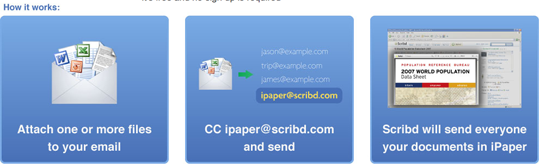
In an exchange for convenience, users will have to deal with a few quirks. Every time you send an attachment using the service, your recipients will receive two messages: the original message with the attachment, and the one that Scribd sends containing a link to the iPaper version. Some people might like having an original copy of the document, but the prospect of getting even more email is a bit of a turn-off. Users can also simply choose to download the original document from Scribd as well.
The document is set to private at Scribd, which means it isn’t included in their directory or indexed by search engines. That still means this is a poor choice for sensitive documents since you are posting them on the Internet. But for less sensitive materials, this sure beats sending around huge attachments by email.