
TechCrunch Disrupt Is Coming May 24-26 »
Dropbox: The Online Storage Solution We've Been Waiting For?
by Mark Hendrickson on Mar 11, 2008

Dropbox was one of the most impressive startups I saw at Y Combinator’s demo day this past August, not because they’ve built anything terribly prescient or awe-inspiring, but because they’ve come up with an online storage product that I might actually use regularly.

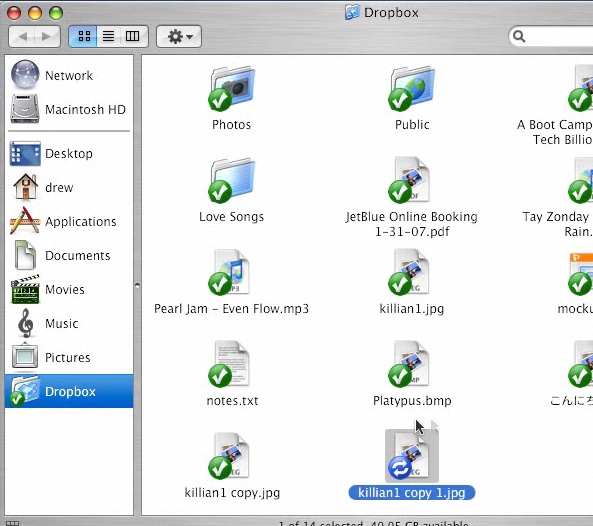
The idea behind Dropbox, which officially enters into private beta today (with 200 invitations available for TechCrunch readers, each of which provides a free 5GB of storage), is that little to no effort should be put into keeping your desktop files synced with “the cloud”. So the three founders have built a Python-based desktop client (available for both PCs and Macs) that acts like a regular folder on your machine. You can manage files within this folder just like elsewhere on your machine (add, edit, copy, and delete them) and changes will be automatically synced to Dropbox’s Amazon S3-backed storage, and very quickly at that. See a screencast here.

At the very least, you can use Dropbox to automatically backup a subset of your files, and to access them when traveling. You can also use the service to easily share files with friends and coworkers. Just right click on a folder and select “Share”. You’ll be taken to a webpage where you can enter the email addresses of who you want to share the folder with. When your friends add files to that shared folder, they will automatically get downloaded to your machine in addition to getting backed up online. If you have Growl installed on the Mac, it’s quite impressive to see your friends’ files magically show up.
This should sound a lot like Microsoft FolderShare, which had it own set of minor announcements yesterday. That’s because FolderShare has been providing a desktop client that syncs local folders to online storage across computers for years now. But it’s a bit like comparing Vista to MacOS; both get the job done but only the latter is actually pleasurable to use and appears designed for maximum customer satisfaction. (Update: As a commenter points out, FolderShare doesn’t actually back up your files online, just facilitates syncing between computers, so this is a big difference too).

Dropbox tops FolderShare in a number of ways beyond simple ease of use matters. You can access your files through the web browser in addition to the desktop client. All files are version controlled so you can revert to an earlier version of a document, or restore it completely when lost. There are also two special folders within the local Dropbox folder: one for publicly sharing files (via distinct URL) and one for sharing photos (which also get distinct URLs for particular galleries, which have been formatted online for easy viewing).

Dropbox is obviously just breaking into a market with other well-established and competent players like Box.net and Mozy, among several others. But I can’t help but feel as though Dropbox has finally come up with a solution that the casual consumer will enjoy using on a daily basis.

Advertisement
Advertisement

Responses

Comments rss icon

  • it’s only 10am PST and seems like already there have been 15 YCombinator stories today :)

  • snazzy demo. hopefully they send out beta invites fast.

  • Yea!! Python — my favorite language. Can’t wait for Resolver.

  • Nice.. and so many drop-* names, dropbox.. dropsend.. http://www.drop.io, and so many box-* names as well.. ;-)

  • You must not have used FolderShare before to say this, how much simpler do you want it? I mean I drop files on a folder and they appear on all my computers. I have been using FolderShare for almost a year now, and I don’t even think about it anymore, it just sits there and it does its job.

    I will still try this DropBox solution to see what you mean.

  • “That’s because FolderShare has been providing a desktop client that syncs local folders to online storage for years now”

    Last I checked, and it has been a few months now, FolderShare did not sync with online storage of any kind. It’s purpose was for P2P like syncing between your machine and:
    – your other machines
    – machines belonging to people you’ve shared a folder with

    I one time tried to use it to sync to online storage by having the FolderShare client run on and always-on server, but that brought more trouble than it was worth. I was trying to use it for something it wasn’t created for.

    That said, it has been a while since I looked at it. Maybe they have added a sync to online storage since?

  • And the invites are all gone… :(

  • “This registration key has expired.”
    Already.
    Wow, power of TC!

  • Too-easy sync’s could be considered harmful.

  • What about Google’s Gdrive?

  • It looks promising, but I am curious if it can be used to share files with clients. Finding an inexpensive place that allows the people that I work with to access my information is difficult, especially at large file sizes. I look forward to test driving it.

  • So I loaded up the program and started linking the account to my desktop… and THEN it tells me the reg key had expired. Boo.

  • Where did the post on AllTop go? It was there for a second and then I refreshed and it was gone. Weird.

  • Didn’t get the code, says already expired.. Tried installing the 7MB(!) windows client on WinXP SP2 — auto-restarts the desktop (even though it didn’t reboot the pc) without warning, not too nice.

    With the client installed, now clicking-open the “My Computer” icon has a 2 second showing-the-blank-window-delay-then-comes-the-drives-icons.. obviously not too satis as far as user-experience is concerned.. 8-)
    (But yeah, it’s beta..)

  • LOL at the demo video where the IM pops up that says “Why do you keep sending me this crap???”

  • Hmm.. looks very similar to SugarSync (http://www.sugarsync.com/).. which I have been using for some time now and its really great (although only 1Gb free storage rather than 5Gb) .. Im now at the point where I cant survive without it as I find it really essential for keeping those little files which you normally find yourself scrabbling for a usb key drive or burning a few Mb of file to a CD or DVD so you can move them onto a new computer or a friends machine :) If DropBox is as good then it should make a lot of people happy!

  • So I noticed (about the invites being gone). Oh well. I signed up for the beta anyway. I hope.

  • I’ve been in the DropBox beta for a couple of weeks now. It is a slick implementation, an extremely simple interface with embedded right click menus and icon overlays.

    It seems like a great file sharing platform, although I couldn’t find any way to share files using the desktop client I have.

    This isn’t a viable backup platform, as it requires that I must remember to put my files into the DropBox folder. Secondly, and most importantly, this doesn’t feel secure. Does anyone know if they are encrypting files or storing them in plaintext in S3? Yikes…

    Online backup platforms like http://www.mozy.com and http://www.elephantdrive.com are much better suited.

  • hehe you have a folder called “Love Songs”

  • 200 more invites have been added to the signup link above. Get em while their hot.

    @Todd – agreed if you want to do system-wide backups; this will work if you only want to backup your most critical files though (docs, photos, etc). The founders also say they’ll be working on tech that can do more widespread backups instead of just folder-specific ones.

  • A company with $15K of funding?

  • @13 – echo.. probably retracted or something.. Was actually commenting on it, then disappeared… was saying, a great portability demo.. ported model (popurls), ported content (rss), ported software (electricpulp)… though unlikely built in 5 minutes.. :-)

  • Would you trust your data to a company that can disappear the next week?

  • Definitely checking this out. It’s refreshing to see something a bit more user friendly when it comes to the whole online storage market.

  • hey guys –

    drew here from dropbox –

    thanks for the comments and feedback!

    just wanted to touch on security: we encrypt files using AES-256 before storing the file data on S3, and the underlying transport (for everything) is SSL. (we’ll also be adding the ability to provide your own private key.)

    hope this helps –

    drew houston
    ceo, dropbox

  • This is just like Beinsync that has had a product in this space for years but only PC not mac.

  • Our workstations are Redhat. I got the following errors with the latest wine from winehq.org
    cat dropbox.exe.log
    Traceback (most recent call last):

    File “dropbox.py”, line 2, in

    File “zipextimporter.pyc”, line 82, in load_module

    ….

    ImportError: MemoryLoadLibrary failed loading win32process.pyd
    To the Devs:
    I will try later using VMWare. I know Wine doesn’t have to be supported, but you should at least try for compatibility. Not everybody runs windows or mac.

  • hmm, does no one remember i-drive and x-drive? the folder where you drag stuff and it gets synched to the cloud idea has to be a decade old at this point.

  • That is a startup I’ve been waiting for!! Just started using and it is really amazing!
    Nice work! I hope they keep up with the quality when they open to the public.

  • There are some session/cookie errors happening on the site. E-mailed them to let them know.

Advertisement

Leave Comment

Commenting Options

Trackback URL