Logitech Harmony Remotes
MSRP: $40 – $399
Product Page
Good For: People with multiple AV devices, each with their own remote
Not for: Luddites
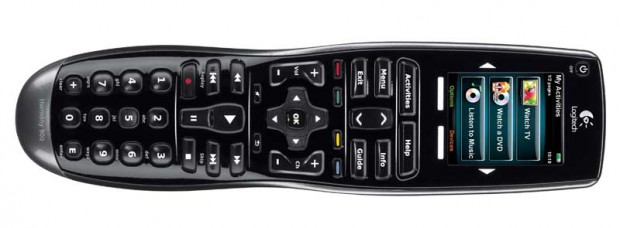
OEM remotes are little demons, set to hassle owners and confuse guests. They’re horrible and not one is worthy of its space on this earth. They get exorbitantly more painful when another one finds its way into the livingroom and joins the horde. It’s best to cast them away from the coffee table to a junk drawer and instead use a true universal remote like on from the Logitech Harmony series.
There isn’t a more consumer-friendly solution available. It seriously takes about 8 and half minutes to program a Harmony to control an entire AV setup. The online software easily creates natural macros that places compenents within activities rather than functions. Selecting the Watch TV button will power on the TV, cable box, and if necessary, AV reciever and then set each device to the appropate input/mode. The volume keys will automagically operate the AV receiver while the channel input buttons sends commands to the cable box — all without pressing a device button.
The series starts out at $40 with the 300 that can handle just a Watch TV command. Each model increases substantially in price but also feature set as well. Higher models gain LCDs, touchscreens, recharging docks, even RF modes for out-of-sight device control.
Don’t pay for retail for these things though. They can often be found well under their MSRP with a quick Google search. Trust us, what ever one you get (I have the 600 & 900), it will quickly become one of your favorite things as well.
Matt Burns loves writing, gadgets, and puppies. Stalk him on Twitter or contact him direct at Matt@CrunchGear.com.