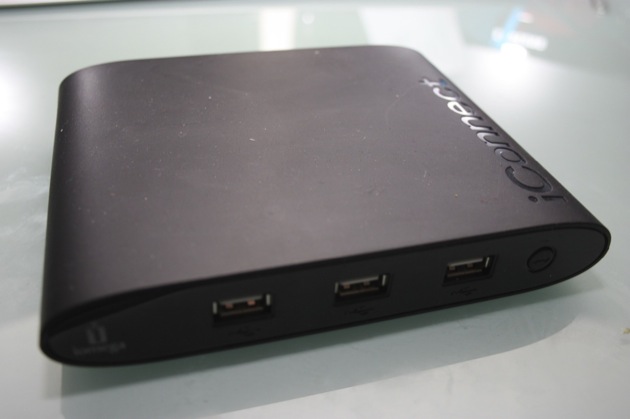
Short Version: We now have so much storage in our homes that we could probably, each of us, start our own Rapidshare service. But how do we get all that data to the other machines on our network or, better yet, out onto the Internet?
Devices like the Iomega iConnect allow us to place storage space on our internal networks and expose that data to the world, as needed. However, the iConnect also creates a local iTunes share, adds a Time Machine back-up location, and performs a few other tricks all for $99. While it’s not perfect, it’s pretty cool.
Features:
- Four USB ports
- iTunes/Time Machine support
- Printer support
- Wireless
Pros:
- Shares data locally and with the world
- Compact
- Built-in Ethernet port
Cons:
- iTunes sharing not selective
- Set-up a bit wonky
- Doesn’t work with Drobo
The Iomega iConnect Wireless is, in short, a NAS without drives. You can stuck up to four devices onto this thing and even print wireless over your network. When you need to grab a file from one of your drives – and if you’re like me, you have plenty – you just connect to that drive. When you take the drive out of the network it disappears. Add it again and it reappears. The system also offers a remote access service with your own private URL mapped to the iConnect.
The device is fairly easy to set up. You connect to a network, run the enclosed software, and add a disk. As soon as a disk is plugged in it appears as a share on your network. A click and you’re in.
Setup is very straightforward. The desktop UI is barebones and the web UI isn’t much more complex. It isn’t for the average user but you could set it up for Grandma and tell her how to watch her soaps. Besides, it has a Torrent client built right in so she can DL her things on the DL.
For $99 you get a lot of features. Is it better than something like the Netgear Stora? That depends on how many loose drives you have in your collection. If you need to get your data online in a hurry, however, this is a good solution.
In the comments for our quick look one reader, Bryan, found that the device doesn’t support the Drobo, which is a problem. It also seems to only support FAT, FAT32, and NTFS, which could be a problem for larger files. However – and I haven’t tested this – most devices like this will handle large files thanks to the sharing properties and protocols used. The disk format seems to be invisible to OS X.
Product Page: Iomega iConnect