Creately, an online diagramming and design application launched by Cinergix and showcased at TechCrunch50′s Demopit in 2008, is unveiling its online tool to the greater public (the startup has been in private beta). Creately lets anyone create create and collaborate on flow charts, wireframes, network diagrams, sitemaps and more within its site.
The key to Creately’s application is that manages to harness the abilities and tools that traditional design and graphics software offer, but packages this functionality in an easy to use application that allows for collaboration between users.
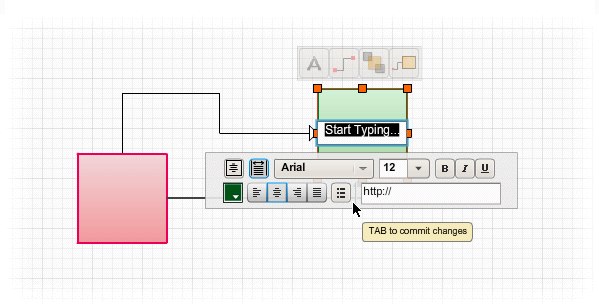
The design features are varied but relatively easy to use and intuitive. For example, Contextual Toolbars appear when you click on any object on the drawing canvas and depending on the object and its size will offer all the commonly used operations within the toolbar. Collaboration is another crucial part to the design process, says co-founder Charanjit Singh, so the startup built in commenting, sharing, publishing, embedding and the ability to publish directly to Twitter. Plus, many of its offerings are free to use.
With this public launch, Creately is also unveiling its pricing model and monetization strategy. Creately will offer a free plan that lets users makes and unlimited amount of public diagrams that can are published on Creately and visible to anyone. Free customers are restricted to a maximum of 5 collaborators and all diagrams will be published with the Creately logo. Diagrams can also be embedded and shared. The paid version will offer an unlimited amount of privately-hosted diagrams that will not have the Creately logo. But it’s unclear how much Creately’s paid version will cost and we’ve contacted the company for further explanation.
Microsoft offers a design program, Visio, that’s has similar functionality to Creately but is more complicated to use and is not web-based.


http://my.lovelycharts.com/ is a nice software too.. (I am not associated with lovely charts, just like the software)
Omni Graffle is another program with similar functionality. Like Microsoft Visio, it is not web-based.
I’ll definitely give it a try.
Seems like this goes head to head with gliffy.com.
There’s no feature for timelines, I need it to explain RTS strategies.
Looks nice, I’ve been using the open source Dia lately.
Similar tools:
http://www.gliffy.com
http://draw.labs.autodesk.com
http://www.flowchart.com
I’ve tried them all, just tried this and this is by far the slickest I have ever used.
Tried them all and just tried this. by far the best tool I’ve seen.
imho, there are no significant differences between them. the first one that allows me to import and export Visio will win me as a client. today only gliffy and autodesk draw allow exporting. draw is ugly as most autodesk products (and down at the moment).
looks just like gliffy. nothing new there…
Disagree with the nothing new here.
The innovation is in the smoother workflow, contextual features and the intelligence built into the objects. None of this is matched by any other app available online or offline.
Take a look at the video and to see what really makes Creately different.
nothing new? Obviously you haven’t tried the app. I’ve been using it in private beta and It blows Gliffy away.
From search.twitter.com
solidsmack: @josephflaherty boo for both creately and visio… http://www.flowchart.com/
I think you’ll should USE the app’s before comparing
Yes Griffi LOOKS like Creately but not even close when it comes to it’s capabilities.
think inside the skirt not outside..
flowchart.com?? seriously.. come on Jake!!
Very nice Flex/Flash implementation. Continue to be impressed by how these techs are being applied. Go ahead and flame me re: proprietary, HTML5 better, jQuery, etc. These are still impressive technological applications along with Aviary, and not *that* hard given the capabilities Flex/Flash provides. Hopefully Adobe is really buckling down to improve the Flash VM as I’d like to see it continue its leadership in this area.
Your totally right. It’s trendy to bash anything related to the Flash Platform but it really is powerful and a mature toolset for developers. Flash isn’t going away that’s for sure. Aviary is an amazing showcase of the potential for the platform.
And people are only moving away from flash at a less than exponential rate.
Hi Leena, thanks for the writeup on Creately.
We haven’t announced a paid plan for everyone yet, just a special time-limited “Name your Own Price” plan for our Beta users to thank them for all their help and support.
Creately is being used all over the world in diverse fields and we’re hoping our little pricing experiment will teach us a little more about our customers and the value they derive from Creately.
You can read why we decided to offer a Name your Own Price plan on our blog – http://creately.com/blog/creately/beta-over-creately-launches-new-plans/
And we’ll be sure to keep everyone updated on how our experiment goes. So far, so good.
Charan
Creately.com
I love it when an application that has 10x more features, but not web based is called “more complicated to use”.
simplicity is a selling point… something that gets lost in entrenched products
I just briefly played with this tool and am very impressed. I will look for an opportunity to use it soon and really put it to the test
Mike
Love it. I never liked using visio, I think this will appeal more to the non techies out there (like me!)
Looks good – maybe I can finally retire my copy of “Inspiration”… (very old but good, IMO)
hi …. welcome to the game …. you are only 3-4 years late.
hard to explain technology to a “snotty brat”..
Looks good but Gliffy feels more responsive and easier to use as a casual user and its symbols look more professional
For BPMN process modeling the best free tool in the market is available at http://www.bizagi.com.
And if you want to be able to turn your BPMN processes into running applications, we just released BizAgi Xpress BPM Suite. So go on, visit our web site at http://www.bizagi.com, download it (no questions asked) and experience the power and simplicity of BizAgi Xpress; it provides enterprise class functionality at very low cost!
I’ve used Microsoft Visio, I wouldn’t say it’s complicated to use…its just not intuitive enough…
Cinergix Creately sounds useful, worth trying out in any case…
Thanks for the review…
First with pencil and paper (yeah!) ;-) try Hodges’ model to map ideas, issues AND solutions:
Hodges’ Health Career – Care Domains – Model
Blog – Welcome to the QUAD:
http://hodges-model.blogspot.com/
Website:
http://www.p-jones.demon.co.uk/