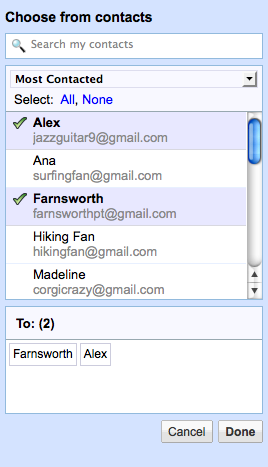
Gmail made a tweak last night that brings better contact management to the service. When you click the “To:” or “CC:” links in front of each address field, a box pops up with your contact list. (See example at right). It is a simple change, but it saves you from having to go to another page to find a contact.
Most of the time, Gmail users probably won’t use this feature because Gmail already gives you a list of auto-complete suggestions as you begin typing in a name into the “To:” field. These are based on people you’ve communicated with recently, and usually does the trick. But if you haven’t emailed someone for a long time, their name doesn’t pop up. It also doesn’t help if you can’t remember their name.
Anything that reduces the amount of steps it takes to complete an email is a plus in my book. However, this feature is a bit hidden. You have to click on the “To” or “CC” links to expose it, something many people might only do by mistake the first time (which is why I’m telling you).
The contact chooser also works for groups.