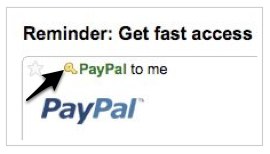
Here’s the latest invention from the Gmail labs team: a verified accounts key to help distinguish spam from a legit email. Last year, Gmail started filtering spam from fake eBay and PayPal emails, requiring actual verification from the source that an email was being sent from ebay.com. Anything that can’t be verified is rejected.
Not many people were aware of this feature, says the Gmail team, so they decided to create an actual icon for a verified account so people would recognize an email address that’s legitimate. If you turn on “Authentication icon for verified senders” from the Labs tab under Settings, you’ll start to see a key icon next to verified emails that are “super-trustworthy.”
What does “super-trustworthy” mean? Brad Taylor, Gmail’s Spam Czar, says the term includes several situations: 1. when the the sender, usually a financial institution, is a target of phishers, 2. all of the sender’s email is authenticated with DKIM, and 3. Gmail rejects any fake messages that claim to come from this sender, but actually don’t.
Gmail says that because of the arduous process for senders to make their email super-trustworthy, the feature is currently limited to just eBay and PayPal. Gmail hopes to add more senders in the future, making the key icon a more widely used and recognizable symbol for verified accounts.