Did you know you can switch tabs in Firefox by making a twisting motion with your fingers on a multi-touch surface? I did. Turns out I’ve been doing it for months — I thought I was late to the party and was too ashamed to mention it to anybody for fear of an epic internet ribbing (“What, you just figured that out?”). But no, apparently it was top secret and highly experimental. That was in the beta, though; it looks like the official version has reduced it to a hack. Fortunately, mastering this multi-touch-enabling technique will allow you to tweak your gestures, resulting in everlasting glory.
- Simply open a new tab (I’ll wait) —
- Put “about:config” in the address bar, no quotes. It’ll ask you if you’re sure. Yes, you are. You are okay.
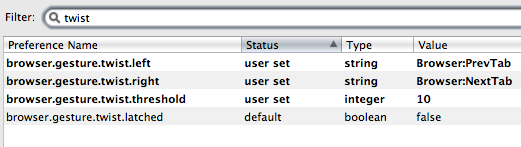
- Ready? Okay, now type “twist” into the search box.
- Double-click on the twist right, and put “Browser:NextTab” into the box, without the quotes.
- Theeen, in twist left, put “Browser:PrevTab” without the quotes.
- You’re done! Now, I found the gesture (it applies immediately, try putting one finger down and rotating another around it) to be a bit slow to respond, so I changed that other setting, the threshold one, from its default (25) to 10. You can mess around and figure out what’s best for you.
See, tweaking is easy! If you’re afraid you’ve ruined something, just right-click (or “context menu click”) on any box you’ve modified and hit reset.
Curiosity piqued? Type “gesture” into the search box and try modifying a few of those settings. I don’t particularly like the twist, so I’m about to set tab switching to three-fingered swipes. Aren’t we just having so much fun?
To clarify: This only works if you have a multi-touch trackpad; if you’ve never used two fingers on your trackpad at once to scroll or anything, you probably don’t have one. Any Mac laptop from the last four years has at least two-finger gestures, so twisting should work.
[thanks to Rafael for the tip and original instructions]