Sure, none of us have the Palm Pre yet – but once you get it, won’t you want to take a ton of screenshots to show off to your friends document the experience?
On the iPhone, taking a screenshot requires no wonky software or hackery – just hold two buttons. I figured a similar function might exist on the Pre, but we had a heck of a time finding anyone who had any idea what we were talking about – until now.
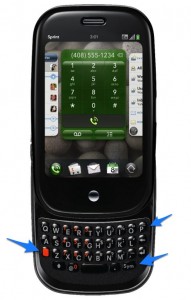
To take a screenshot of the Pre, you’ll hold the Orange, Sym, and P keys. Bam! Instant screenshot, prepped and ready for sending off to Grandma. Because there’s nothing Grandmas love like phone OS screenshots.