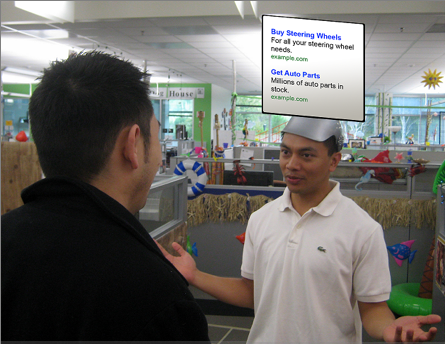
Okay, last Google April Fool’s joke coverage (maybe). This one is my favorite, along with the paper airplane option in Google Docs. The picture says it all: AdSense for Conversations. Excerpt from the Inside AdSense blog:
Now, in just a few simple steps, you can begin displaying ads that are relevant to the topics you’re discussing — in an unobtrusive screen above your head.
Anyone taking part in the conversation can hit the ad with their hand to immediately take advantage of the product or service being offered. With our new Teleportation Technology(TM), you’ll be transported directly to the site where the service is available, or have the product appear instantaneously in your hands.
How do I add Google ads to my conversations?
Once you sign up . . . , we’ll send you an adjustable screen and special AdSense headgear to attach it to.Why are my ads not targeted to my conversation?
If you’re not seeing targeted ads, it may be that you haven’t discussed a particular topic long enough for our system to determine the meaning of your conversation. We recommend rambling and repeating yourself to help our system pick relevant ads to display. Also, you may wish to try our voice targeting feature — you can speak more loudly to emphasize certain phrases. However, these activities may result in socially awkward situations, so please proceed with caution.
More Google April Fools Craziness: