
Web-based spreadsheets like Google’s are great for collaborating, but slow you down when it comes to clicking through cells quickly or creating really big spreadsheets. It doesn’t even have a search function other than what your browser can do on its own (try finding a name in a list of 500). Desktop-based spreadsheets like Microsoft’s Excel give you all the features and speed you want, but are not easy to share. (Yes, there is SharePoint, but most people resort to e-mailing the bulky files around, creating a version-control nightmare).
Tomorrow at noon (Update: this has been pushed to November 15), Transmedia, a New York City startup, will take a step towards bridging those online and offline worlds. It is adding a spreadsheet to its Glide service called Glide Crunch. (Good name!). So far, all of the apps on Glide—including a Word processor, presentation software, e-mail, calendar, contacts, and online photo, video, and music sharing—have been completely Web-based. But with Glide Crunch, the spreadsheet will operate as a local application on your desktop that is automatically synced to your Glide Webtop without you having to do anything special other than create a spreadsheet as you normally would.
Glide Crunch is not based on Adobe AIR or Google Gears, the two main platforms for creating offline, Web-like apps. Transmedia coded the application from scratch using C/C++. In contrast to something like Google Gears, Glide Crunch is not trying to download data into the browser. “We have left the browser,” says CEO Donald Leka. “The browser is limited. It can only hold so much data.” Google Spreadsheet, for instance, only supports 100,000 cells and up to 40 sheets, says Leka. Glide Crunch, in contrast, can support 16.7 million cells and an unlimited number of sheets in a single spreadsheet.
Glide Crunch also supports advanced formulas, pivot tables, various printing formats, and, yes, you can search within a spreadsheet. Leka is really going after Excel users with a powerful local spreadsheet that syncs automatically to the Web, where it is shareable with others. He thinks his new spreadsheet will meet the needs of 60 to 70 percent of the market. “Scientists and financial-modeling experts can continue to use Excel,” he allows. But Glide Crunch is robust enough for him to use to manage Transmedia’s P&L. “We use Glide for everything,” he says.
Glide, which is free for the first two gigabytes and $50 for 12 gigabytes, comes with all of the Web apps listed above and also works on the iPhone and other mobile devices. (it is great for showing PowerPoint slides on your iPhone, which you previously could not do). Later this month and next, Transmedia will be rolling out local versions of its other productivity apps, starting with Glide Write, then e-mail, and Glide Presenter. Glide may not have the user numbers of Google Docs (Glide has about 500,000 total users, 14 percent actually pay), but it is pushing the envelope in terms of functionality and in terns of fusing the Web and the desktop. The company’s revenues are closing in on $4 million a year, with no VC money. The $6.5 million it has raised has all been angel investors, including several ex-Wall Street analysts like Harold Vogel.
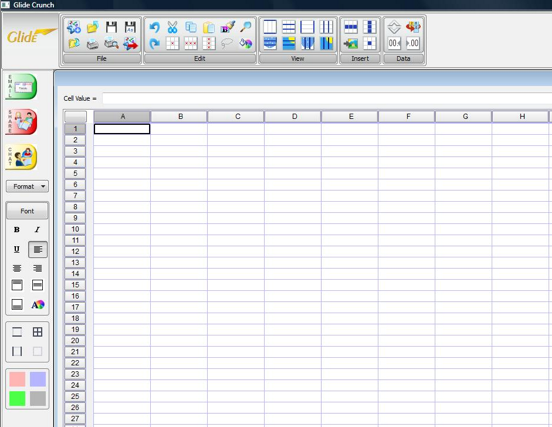
Here are some of the advanced functions and features Glide Crunch will support:
Function
Sin – sine function
Cos – cosine function
Tan – tangent function
Asin – arc sine function
Acos – arc cosine function
Atan – arc tangent function
Sinh – hyperbolic sine function
Cosh – hyperbolic cosine
Tanh – hyperbolic tangent function
Asinh – hyperbolic arc sine function
Acosh – hyperbolic arc tangent function
Atanh – hyperbolic arc tangent function
log2 – logarithm to the base 2
log10 – logarithm to the base 10
log – logarithm to the base 10
ln – logarithm to base e (2.71828…)
exp – e raised to the power of x
sqrt – square root of a value
sign – sign function -1 if x<0; 1 if x>0
rint – round to nearest integer
abs – absolute value
if – if … then … else …
min – min of all arguments
max – max of all arguments
sum – sum of all arguments
avg – mean value of all arguments
and more…
Operator
and logical and
or logical or
x or logical xor
< = less or equal
>= greater or equal
!= not equal
== Equal
> greater than
< less than
+ Addition
– Subtraction
* Multiplication
/ Division
^ raise x to the power of y
! factorial